
Procedure for correcting screen brightness for flats field creation
This page describes the procedure for correcting the screen brightness for flats field creation
- 1. Purpose of this procedure
- 2. Problems encountered
- 3. Workaround
- 3.1 Upgrade
- 3.2 Tests
- 4 Conclusion
1. Purpose of this procedure
I am sharing with you my feedback with a problem with horizontal bands on my flats
which I managed to get around with the procedure below following the purchase of a
Lacerta FCB controller + flat screen from the same brand which allows me to manage
my flats from the N.I.N.A application.
(Automated adjustment of the brightness for each of the filters and the triggering
of the flash just after that of the shutter)
All my tests were carried out with an ASI1600 MM pro camera: Gain=75; offset=15; flats with ADU=40000 +/-5%; CLS filter
2. Problems encountered
2.1 Problem 1
- The brightness is much too strong to have exposures > 0.1s with the brightness set to at least 1% which is not recommended with a CMOS sensor like the ASI 1600!
- This seems surprising when you know that this flat screen is made for photo sensors because I can properly light my living room with this screen which is more made for nightclub effects 😄
- When I opened the screen to flat, nothing surprising given the impressive number of LEDs!
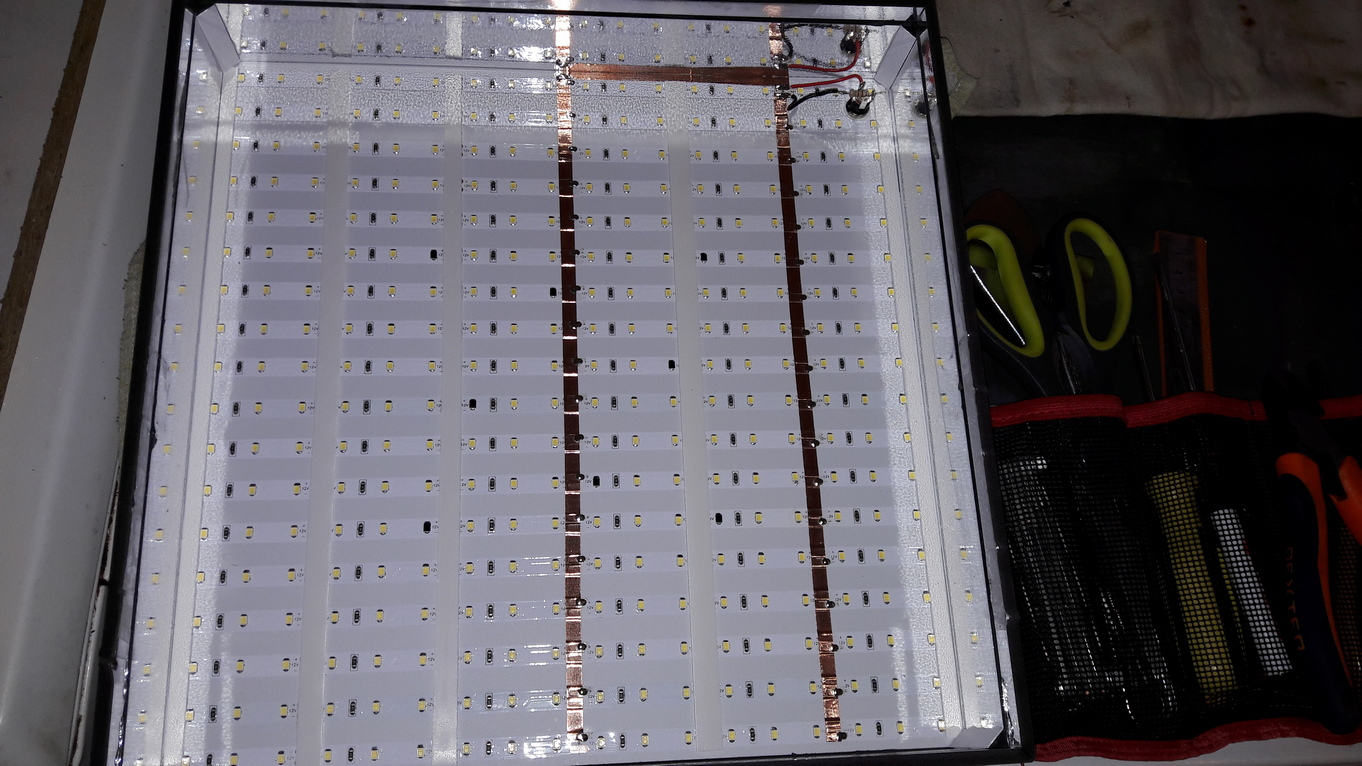
2.2 Problem 2
- On the flats created with a very low exposure time and the brightness set to minimum (1%) for my CLS luminance filter which is bright, I clearly see horizontal bands appearing 😦

- I tell myself that it's not too bothersome if the master flat manages to filter this frequency which is variable by adding around fifty raw flats: not a good idea!

- The Master flat does not effectively filter the horizontal bands which remain visible even with a large number of flats added (50)
- From what I understand, from an electronic point of view, it seems that the variation of the intensity of the LEDs is managed by a switching power supply or equivalent and therefore adds to the DC input voltage a frequency which is clearly visible on flats taken at low exposure time and low brightness
3. Workaround
3.1 Upgrade
- Add a resistance inside the flat box at the level of the wires soldered to the input socket to reduce the power of the lighting
- Intensity before modification: 1.7 A / 20 W!
- Intensity after inserting a 220 Ohm resistor - 1/2 W: 60 mA / 0.75W
=> The brightness is already more acceptable for doing flats with an astro camera!
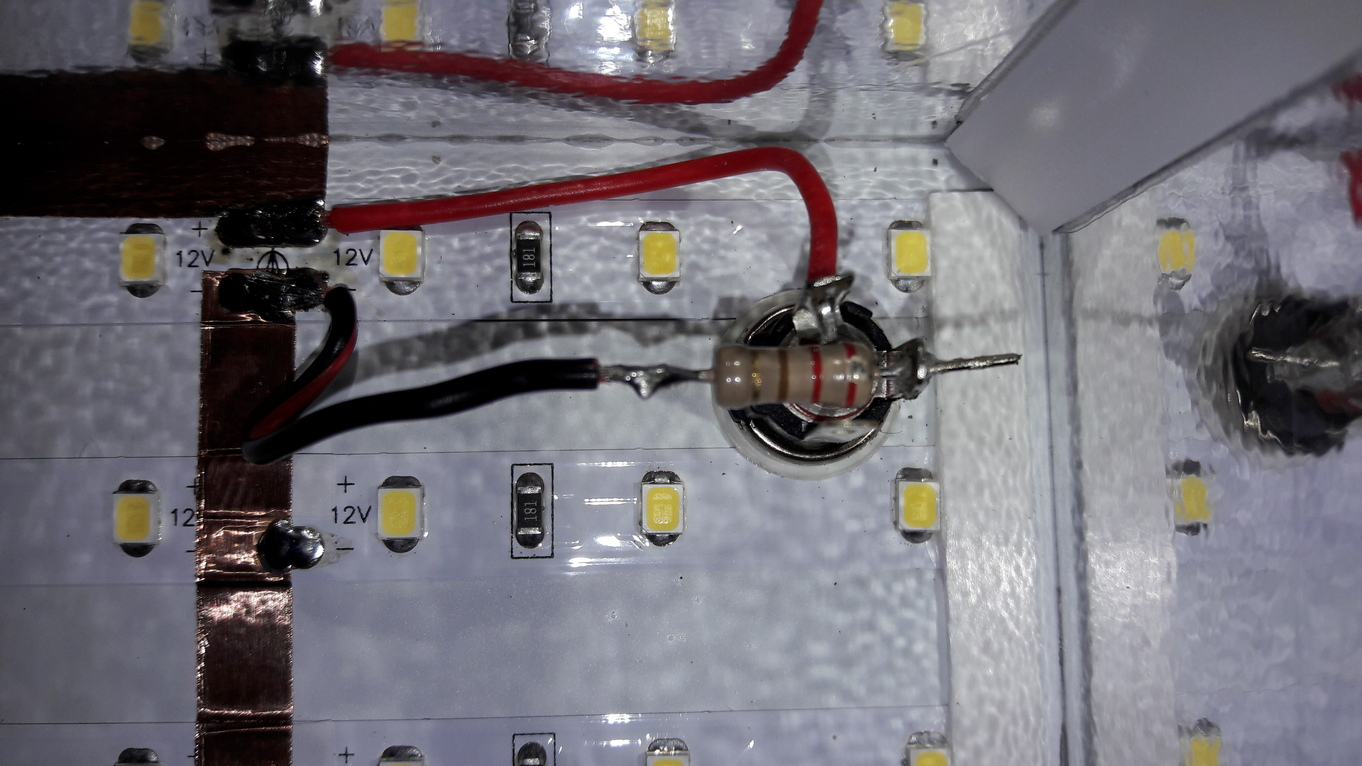
3.2 Tests
- Flat created with an exposure time of 0.22s and brightness set to maximum (100%)

=> The horizontal bands have disappeared.
- Flat created with exposure time 0.36s and brightness 50%

=> We see that the bands are still present as soon as the brightness is < 100% because the frequency of the LED power supply becomes non-zero again.
- With the addition of resistance and max brightness, my least bright filter S2 generates a flat with an exposure time of 8.75s which remains correct.
4 Conclusion
- The bypass which considerably reduces the default brightness of the screen makes it possible to make the frequency zero by setting the brightness to the maximum for all the filters and therefore to have "clean" flats, i.e. without horizontal bands 😛
- You must therefore always set the brightness of the box to the maximum because otherwise the switching power supply introduces a frequency which will be visible (hence the resistor which allows the brightness to be reduced on my model and allows the lighting power to be adjusted to 100%).
- For LRGB filters which are very bright, you have to lower the gain because the brightness is set to maximum so as to have a not too short exposure time of at least 0.5s (personally, I use a gain of 75 with my ASI1600MM camera)
- For "SHO" interference filters which are less luminous, you must on the contrary increase the gain in order to have exposure times that are not too long, less than 20s (personally, I set the unity gain to 139 with my ASI1600MM camera)
